MenuList
Feature overviewSee the complete MenuList system.

Start

Menu importStart from the menu you already have.Menu content prepDescriptions, images, and languages prepared for review.Featured ChoicesGuide customers to popular, quick, and value choices.

Publish

Official Business PageOne customer link for public business details.QR menu and linksShare the current approved menu everywhere.Print-ready kitTemplates, editor, QR, and printer files.

Operate

Owner PWA dashboardCore owner workflows from phone or PWA.Business HealthKnow what needs attention.Customer feedback loopPrivate issue reports from public views.Public discoveryA clearer source for search and answer systems.
Start from one approved sourceThese features work together so customers keep reaching the current menu, page, QR, and public link.
Upload current menu
How it worksMulti-locationPricing
Resources
Menu EngineeringQR Menu GuideDigital Menu vs PDFGoogle Menu GuideRestaurant Menu SEOAI Search & Menu DiscoveryOfficial Menu SourceAll Resources
LoginUpload your menu →

Menu import

Start from the menu you already use.

Upload a photo, PDF, typed menu, or permission-confirmed public menu link. MenuList prepares a review-ready draft so the owner approves the version before anything becomes public.

Upload your menu →See all features
Source protectedReview before publish

Photo, PDF, text, or owned link becomes a draft

The create flow and owner dashboard can accept supported menu sources, including an existing public menu link when the owner confirms permission to import it.

Photo menuPDF menuExisting link
Review before publishPhoto + PDF + Existing link
Review the prepared draft.

Sections

Items

Prices

Photo menuPDF menuExisting linkLanguage-readyOwner review

Import journey

From current menu to owner review.

The import page should prove one thing quickly: owners can begin with what they already have, then approve the version customers see.

StartUse the current menu source instead of a blank setup screen.ReviewCheck the prepared structure before anything public changes.PrepareAdd the support work that helps the public menu feel complete.PublishMake the approved version the version customers use.

Start from source

Use a real menu source.

A photo, PDF, typed list, or permission-confirmed public menu link can become the starting point for setup without rebuilding from a blank screen.

PhotoPDFLink

Photo capture

Good enough for owners who already have a printed or WhatsApp menu.

PDF upload

Use the file already shared with customers or staff.

Existing link

Paste a public menu link you own or have permission to use.
Owner control

Review the prepared draft.

MenuList organizes sections, items, and prices so the owner can check a prepared draft before customer publishing.

SectionsItemsPrices

Structure visible

Owners can see the prepared menu shape before customer publishing.

Approval gate

Imported content is not treated as public truth until reviewed.

Current source

The import stays anchored to the menu material the owner provided.

Setup support

Prepare the menu around the source.

Descriptions, images, and customer languages can be prepared where the plan and credits allow, then reviewed before publishing.

DescriptionsImagesLanguages

Less typing

Owners avoid starting every item from scratch.

Language support

Customer languages can stay tied to the same menu source.

Visual support

Photos or generated item images can fill gaps after review.

Public source

Publish only the approved version.

The imported menu becomes useful only when the owner-approved version powers the public menu, Official Business Page, QR, and links.

ApprovedCurrentPublic

Owner approved

The published menu follows the owner-reviewed draft.

Official source

Customer surfaces point back to the approved MenuList source.

No auto-publish

Import stays a setup path, not uncontrolled public copying.

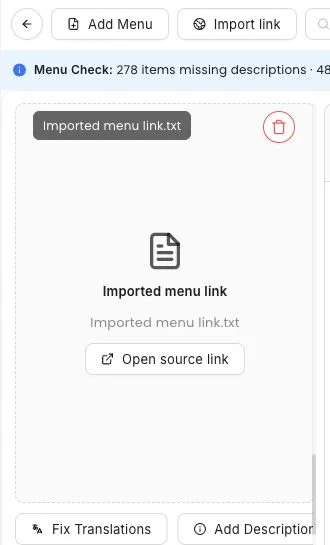
Real owner screen

The original menu source stays visible during setup.

This screenshot uses the current owner workflow to show that MenuList starts from the menu the business already has instead of asking owners to rebuild everything from a blank screen.

Imported source

Menu link kept with the working menu

The owner side keeps the imported menu source connected to the prepared menu so review work starts from real business content.

MenuList owner screen showing an imported menu link source connected to a menu setup flow

What this replaces

The hidden setup work stays lighter.

This folds link import, photo/PDF intake, typed menus, and owner-review anxiety into one owner-readable path.

Accept the menu source owners already have

A business should not need a spreadsheet, design file, or technical setup before MenuList can prepare a review draft.

Menu photosPDF filesOwned public links

Keep permission and publishing boundaries clear

Existing public links are owner-provided inputs. They do not become public MenuList content until the owner checks and approves the draft.

Preview firstApproval gatePermission-aware

Owner control

Nothing public should come from an unchecked import.

Import is a starting point. Owner approval is still the publishing boundary.

Owner review before publishing

The public menu stays tied to what the owner approves.

Preview before customers see it

The prepared menu can be checked before it becomes the customer-facing version.

Works with current material

Owners do not need a design file, spreadsheet, or technical setup to begin.

Permission-aware source use

Existing links are owner-provided inputs with permission confirmation. MenuList is not an uncontrolled menu scraper.

Start here

Your current menu is enough to begin.

Upload what you already have, review the prepared version, and publish only when it looks right.

Upload your menu →Back to all features

Ready when the menu is

Put your menu online from the version you trust.

Start from the menu you already have. MenuList prepares the customer-facing version and keeps the links and materials around it.

Upload your menu →See plans

Owner approval before publishing

The public menu should come from the business, not from old PDFs or scattered screenshots.

One approved source

Customers keep reaching the current version instead of old PDFs, screenshots, or scattered links.

Simple for one location. Ready for many.

Start with one business. Keep the structure ready for locations, governance, and public consistency.

MenuList

One official source for your menu and business details.

MenuList keeps the menu you approve behind the links and materials customers use.

hello@menulist.ai
XInstagramLinkedIn

Product

  • How it works
  • Features
  • Multi-location
  • Pricing

Start

  • Public proof
  • Official Business Page
  • Upload menu

Resources

  • Menu Engineering
  • QR Menu for Restaurants
  • Digital Menu vs PDF
  • Google Business Profile Menu
  • Restaurant Menu SEO
  • AI Search & Menu Discovery
  • Official Menu Source
  • Trust & Security

Legal

  • Privacy Policy
  • Terms of Service
  • Refund Policy

© 2026 MenuList. Built in India.

One public source. Built to be found.