MenuList
Feature overviewSee the complete MenuList system.

Start

Menu importStart from the menu you already have.Menu content prepDescriptions, images, and languages prepared for review.Featured ChoicesGuide customers to popular, quick, and value choices.

Publish

Official Business PageOne customer link for public business details.QR menu and linksShare the current approved menu everywhere.Print-ready kitTemplates, editor, QR, and printer files.

Operate

Owner PWA dashboardCore owner workflows from phone or PWA.Business HealthKnow what needs attention.Customer feedback loopPrivate issue reports from public views.Public discoveryA clearer source for search and answer systems.
Start from one approved sourceThese features work together so customers keep reaching the current menu, page, QR, and public link.
Upload current menu
How it worksMulti-locationPricing
Resources
Menu EngineeringQR Menu GuideDigital Menu vs PDFGoogle Menu GuideRestaurant Menu SEOAI Search & Menu DiscoveryOfficial Menu SourceAll Resources
LoginUpload your menu →

QR menu and links

One current menu for QR scans, links, and customer shortcuts.

Create QR menus, stable share links, and saveable customer shortcuts from the same approved menu source. Print files stay available when owners need physical placement.

Upload your menu →See all features
Share surfaceCurrent menu

QR, public link, and shortcut open the same current menu

Customers scan, tap, or save the menu and keep reaching the latest approved version instead of old screenshots or forwarded PDFs.

QR menu
Public linkSaved shortcutPrint filesPackaging
QR menuPublic linkSaved shortcutPrint filesPackaging

Sharing journey

From one link to real customer surfaces.

The value is not just making a QR code. It is keeping that QR and link attached to the current approved source.

CreateGive customers a stable route to the current menu.Replace old filesStop sending customers stale screenshots and PDFs.PlacePut the current menu where customers already look.UpdateUpdate the source instead of chasing every old copy.

Customer access

Create QR and link access from the source.

Table QR, public menu link, and customer shortcut should all open the same current source so owners do not manage several copies.

QRLinkShortcut

QR menu

Customers scan and open the current published menu.

Share link

WhatsApp, Instagram, packaging, and website links can use one source.

Phone shortcut

Repeat customers can keep the menu close on their phone.
Old-menu problem

Replace static menu copies.

Owners can share the current menu link through WhatsApp, Instagram, Google menu placement, packaging, and staff/customer messages.

Old PDFScreenshotBroken link

Current menu

The link points customers to the approved version.

Reusable link

Owners can keep sharing the same route instead of resending files.

Packaging ready

The same source can travel onto bags, labels, and handouts.

Real-world rollout

Use the same source across physical and digital places.

If the menu changes, existing QR codes and links should keep resolving to the latest approved menu rather than becoming stale design files.

TablesSocialScreens

Print files

Cards and PDFs can start from the same approved menu.

Presence checklist

Owners can see which public placements still need setup or attention.

Approval source

Public materials stay connected to the MenuList source.

Ongoing consistency

Keep shared links useful after updates.

When the owner-approved menu changes, customers should keep arriving at the current public version.

CurrentApprovedReusable

One approved version

QR and links continue to represent the same public source.

Customer actions

Call, WhatsApp, directions, and menu access stay close.

Customer shortcut

Saved access keeps repeat customers close to the same current menu.

Share proof

The same current menu can move into QR, links, and public sharing.

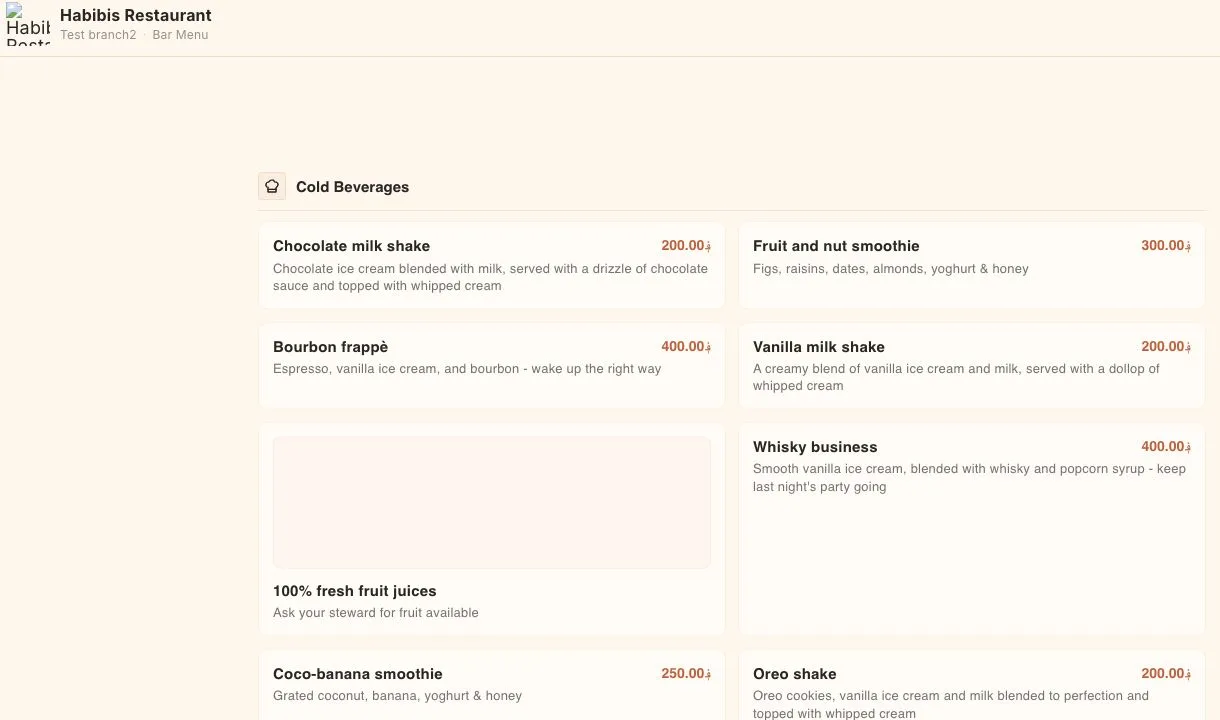
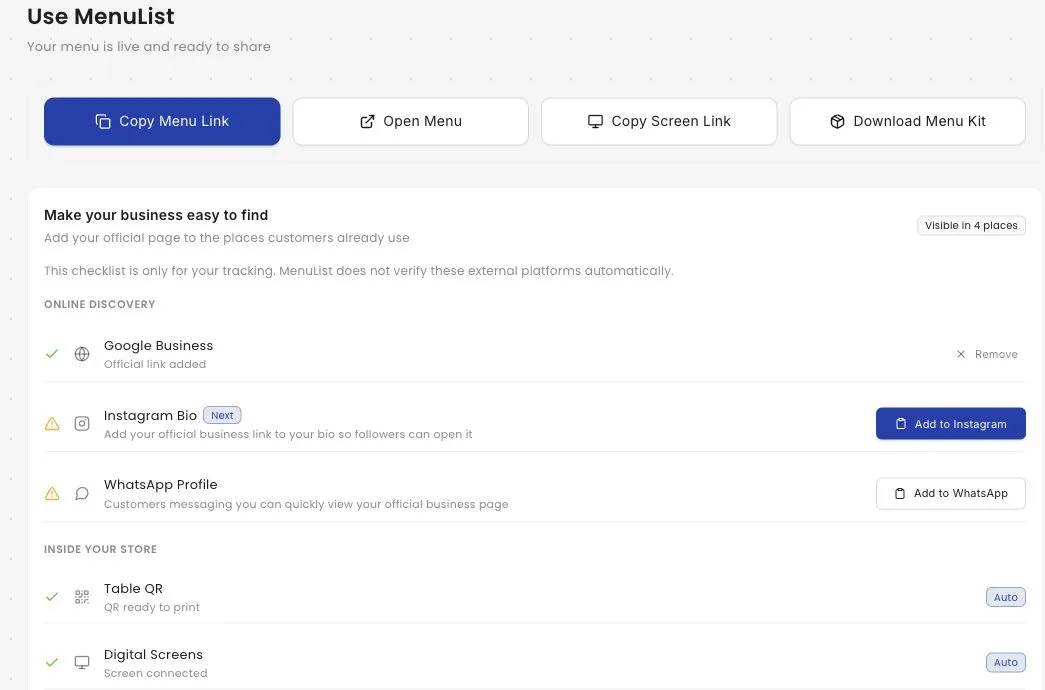
These captures show the real owner sharing surface and the customer menu reached from the public link. The promise stays simple: customers should land on the current approved menu.

Owner share screen

Copy links, QR assets, and placement tasks from one place

Owners can collect the public menu link, screen link, QR code, and placement checklist without hunting through separate tools.

MenuList owner sharing screen showing menu link, screen link, QR code, and placement checklist controls
Customer menu

The shared link opens the customer-facing menu

The public menu shows categories, item cards, descriptions, prices, and customer actions from the current published source.

MenuList public customer menu showing categories, menu items, prices, and customer actions

Folded capabilities

Web sharing and presence fit here.

This page should sell reliable access, while the Print-ready Kit page explains finished printable files in more detail.

QR and link access everywhere

Owners need one menu path that works on tables, social bios, WhatsApp, packaging, Google menu fields, and repeat-customer messages.

WhatsAppInstagramWebsite

Current source, not static files

QR and share links stay useful because they route customers back to the current approved MenuList source.

QR placementPrint placementPublic link check

Consistency

Public materials should not become old menu copies.

QR and links are distribution paths. The product promise is that they keep pointing back to the approved source.

Same approved version

QR and share links can keep showing the current published menu.

Easier updates later

Owners update the source instead of replacing every screenshot or PDF in circulation.

Saveable customer shortcut

Repeat customers can keep menu access close on their phone while the source still updates from MenuList.

No separate QR system

MenuList keeps QR, link, and print assets connected to the same public menu source.

Customer reach

Share the menu once. Keep the source current.

Use one approved menu source for the places customers already scan, open, save, and share.

Upload your menu →Back to all features

Ready when the menu is

Put your menu online from the version you trust.

Start from the menu you already have. MenuList prepares the customer-facing version and keeps the links and materials around it.

Upload your menu →See plans

Owner approval before publishing

The public menu should come from the business, not from old PDFs or scattered screenshots.

One approved source

Customers keep reaching the current version instead of old PDFs, screenshots, or scattered links.

Simple for one location. Ready for many.

Start with one business. Keep the structure ready for locations, governance, and public consistency.

MenuList

One official source for your menu and business details.

MenuList keeps the menu you approve behind the links and materials customers use.

hello@menulist.ai
XInstagramLinkedIn

Product

  • How it works
  • Features
  • Multi-location
  • Pricing

Start

  • Public proof
  • Official Business Page
  • Upload menu

Resources

  • Menu Engineering
  • QR Menu for Restaurants
  • Digital Menu vs PDF
  • Google Business Profile Menu
  • Restaurant Menu SEO
  • AI Search & Menu Discovery
  • Official Menu Source
  • Trust & Security

Legal

  • Privacy Policy
  • Terms of Service
  • Refund Policy

© 2026 MenuList. Built in India.

One public source. Built to be found.